Part 1: StorageClasses
This is my first blog post about containerization and orchestration. The goal is to learn and pass the CKA (Certified Kubernetes Administrator) exam. While preparing for my exam, I’ll create this series, hopefully to help others as well.
In each post, I will:
- Share what I learn so others can follow the same path and improve their understanding
- Review exam-style simulation questions (similar to what you see in the CKA exam)
- Try to solve them myself, step by step
- Explain the commands and concepts involved
So let’s get started and jump right in with the first question.
Q1. Create StorageClasses
There is an existing default StorageClass using the rancher.io/local-path provisioner.
Task:
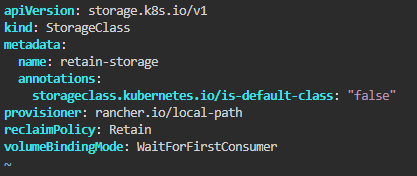
Create a new StorageClass named retain-storage using the same provisioner, but with:
volumeBindingMode: WaitForFirstConsumer
reclaimPolicy: Retain
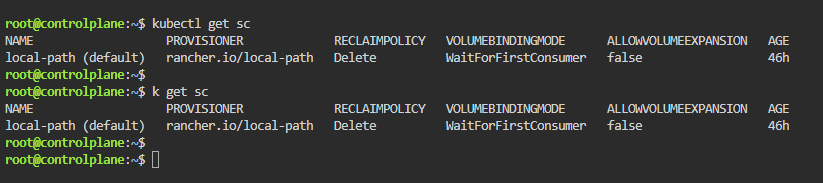
Step 1: Check the existing StorageClass
To see the existing StorageClasses, run:
kubectl get scor the shorter version:
k get scYou’ll see the default StorageClass that uses rancher.io/local-path.
Step 2: Create the new retain-storage StorageClass
Create a YAML file (e.g. sc.yaml):
II like to use the command:
vi sc.yamland jump right inside the file, editing it with insert from the keyboard.
(You can use a default template from the Kubernetes documentation: Kubernetes Documentation | Kubernetes)
The template should look like this (notice the values from the task):
Once you’ve created the file, apply it:
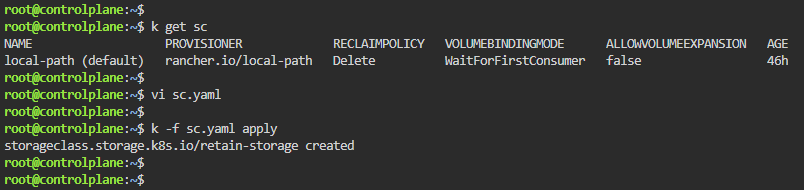
kubectl apply -f sc.yamlor
k -f sc.yaml apply
At the end you can see that retain-storage was created by checking the StorageClass with command “k get sc”