The CKA is a hands-on exam where you solve Kubernetes administration tasks directly from a terminal. One task may require you to modify an existing application configuration and verify that the change works.
This exercise focuses on TLS configuration in NGINX. The application currently accepts both TLS 1.2 and TLS 1.3, but the requirement is to allow only TLS 1.3.
The task tests whether you can:
- Inspect and update a ConfigMap.
- Change the NGINX TLS configuration.
- Restart a Deployment so the Pod loads the new configuration.
- Verify the result using
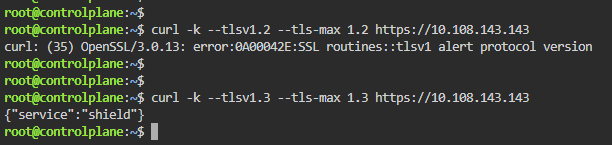
curl. - Confirm that TLS 1.2 fails while TLS 1.3 succeeds.
In NGINX, the ssl_protocols directive controls which TLS versions are accepted. A configuration containing both TLSv1.2 TLSv1.3 allows both versions, while TLSv1.3 restricts connections to TLS 1.3 only.
Exam-style task
The lab exercise is:
The Deployment
shieldin Namespacepublicserves HTTPS through NGINX, but theshield-nginxConfigMap currently allows both TLS 1.2 and TLS 1.3. Update the ConfigMap so that only TLS 1.3 is accepted. Ensure that the running Pod uses the new configuration. Verify from the node that TLS 1.2 fails and TLS 1.3 succeeds against the Service ClusterIP.
The solution is straightforward:
- Update the ConfigMap.
k -n public edit cm shield-nginx
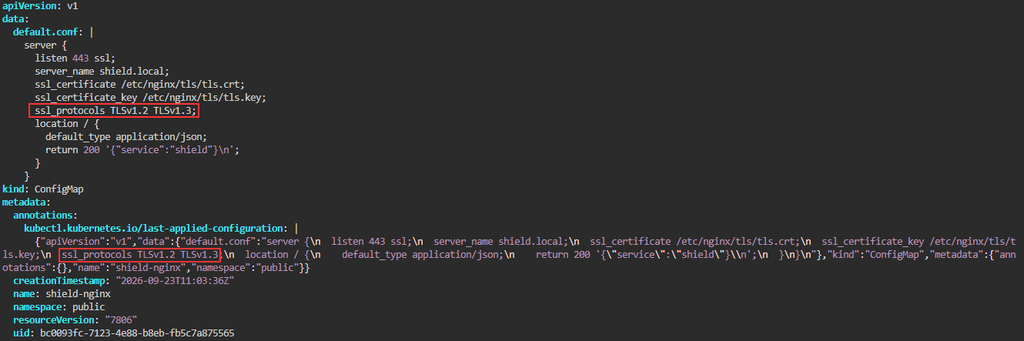
Remove or add the values based on the task/question. In this example: remove TLSv1.2
- Restart the Deployment.

- Wait for the rollout to complete.
- Test the Service with
curl.
Main idea
Changing a ConfigMap does not automatically mean that the application has reloaded its configuration. NGINX needs to read the updated ssl_protocols setting, so restarting the Deployment ensures that a new Pod starts with the modified configuration.
The important configuration change is:
ssl_protocols TLSv1.3;After the restart, a TLS 1.2 connection should fail, while a TLS 1.3 connection should succeed.